How to Build a Personal Website With Codex: The Exact Prompt
A copy-and-paste Codex prompt for building a fast, SEO-ready personal website while learning how the code, content system, GitHub repository, and Vercel deployment work.
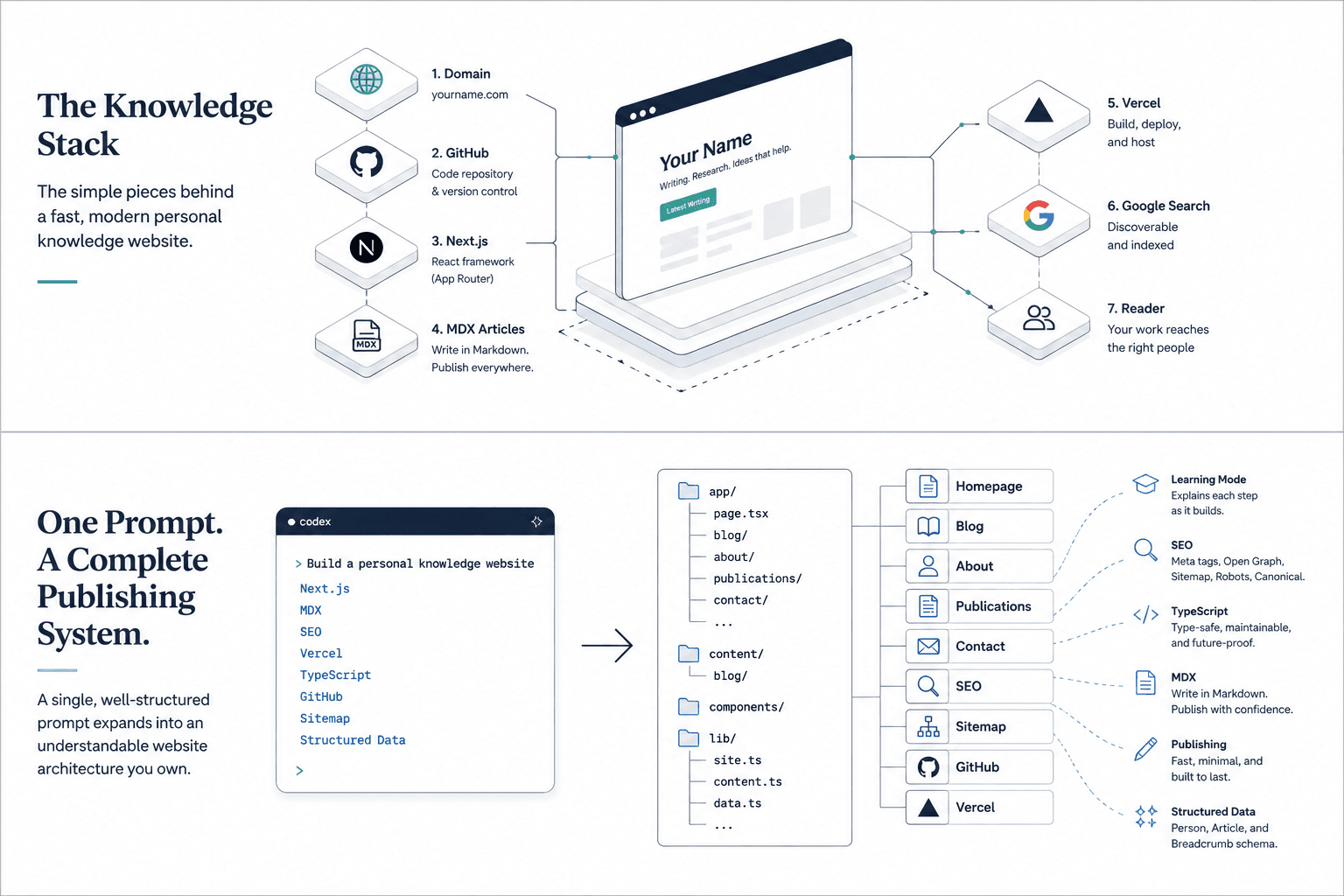
This is the hands-on companion to How I Built My Personal Website in Half a Day for $11.95. That piece made the case for why to build one and walked through understanding the pieces. This one hands you the actual prompt — and sets it up so you understand what it's doing while it does it.
You can ask Codex to build the entire site as a black box, or you can make the build itself a lesson — what I call learning mode. The first approach is faster. The second leaves you better able to maintain, revise, and troubleshoot what you own.
For a personal site you expect to maintain and edit for years, learning mode is usually worth the extra time. A little slower up front, far less helpless later. If your ability to improve the site is limited by what you understand, the build process should increase that understanding.
Here's how to do it.
What you need before you start
You need a GitHub account (stores your code), a Vercel account (puts it online), access to an AI coding agent such as Codex, and a domain. GitHub offers a free tier, and Vercel offers a free Hobby plan for personal, noncommercial projects. Your domain and access to an AI coding agent may carry a cost; a standard .com often costs roughly $10–20 per year, depending on the registrar and renewal price.
How to build a personal website with AI: the prompt
Fill in every [BRACKET], then paste this into Codex. The key line is the last paragraph — it's what turns this from a black box into a lesson. Start Codex from the folder where you want the site created, or open the existing repository first if you're modifying a site you already have.
I want to build a personal knowledge and personal-branding website, and I want to understand the pieces as we build so I can maintain it myself. I am [YOUR ROLE]. Build a clean, fast, publishing-first site with this stack, and after each major step, explain in one or two plain sentences what you just did and why — as if teaching a smart non-engineer.
Stack: Next.js (App Router), TypeScript, Tailwind CSS, pnpm, and local MDX blog posts with frontmatter. Use next-mdx-remote and gray-matter for the articles. Host on Vercel, version with GitHub.
Structure it as: a homepage, a blog index, one dynamic template that renders every article (app/blog/[slug]/page.tsx), three topic/pillar pages for [PILLAR 1], [PILLAR 2], [PILLAR 3], plus publications, about, and contact pages, a shared layout, and sitemap + robots files.
Set up SEO correctly from the start: unique titles and meta descriptions per page, canonical URLs pointing at https://www.[YOURDOMAIN].com, Open Graph and Twitter tags, a placeholder og-default image so nothing breaks, and JSON-LD structured data (Person on the homepage/about, Article on posts).
Create one or two clearly labeled PLACEHOLDER posts so I can see the system work — never invent real facts, credentials, or publications; use obvious placeholders instead. Keep the design minimal and typography-focused, fully responsive, and accessible.
Work through it without stopping for approval on routine steps, but remember: after each major step, tell me in plain language what you did and why. At the end, give me the exact pnpm and git commands to run it, push it, and deploy it to Vercel — and show me how to publish a new article.
That is enough to give the agent a complete first-pass specification. If you'd rather have the agent just ship it fast without the running explanation, there's a stricter "ship mode" version of this prompt at the bottom of the post — same site, no narration.
One important note: don't paste private credentials, API keys, patient information, unpublished data, or anything else sensitive into the coding agent. Keep secrets in local environment variables and in Vercel's environment-variable settings. This matters especially if you work in medicine or research.
Not sure what to use as pillars? Mine are AI in Medicine and Vital8 and preventive cardiology, plus a general writing stream I call The White Coat that lives on the blog — pick the two or three themes your work actually clusters around, and the site organizes itself.
Then you steer
The first result probably won't be final, and that's normal. The real work is the loop: look at what it made, say what's wrong in plain English, let it fix it, repeat. This is the part that feels like building even though you're not typing code. Real examples of what steering sounds like:
- "Put my name in the homepage headline, with the tagline underneath."
- "This copy sounds boastful — make it plain and honest."
- "Make my photo smaller and link it to LinkedIn."
- "The [pillar] page should only show posts in that category."
- "Delete the placeholder posts — here's a real one: [paste your article]."
- "Give my project its own page instead of linking straight out to it."
- "This section is redundant now — remove it."
Notice none of those are technical. They're judgment calls about voice, honesty, and what belongs. That's your job. The agent's job is turning them into working code.
When you get stuck, get curious
You will hit a wall. Something won't work and you won't know why. When that happens, don't just tell the agent to "fix it" and move on — that's how you stay helpless. Ask it: "Explain what this piece is and why it broke, simply." Understand it, then continue.
That habit is the whole game. Every wall exposes either a limitation in the tool, a flaw in the implementation, or the edge of what you understand. The last one is the part you can improve permanently.
Ship it
When it looks right, the last three prompts are:
- "Walk me through pushing this to a new GitHub repo using GitHub Desktop, step by step."
- "Give me the exact steps to import this repo into Vercel and connect my domain, with the plain domain redirecting to the www version."
- "Show me how to add a Google Search Console verification file and submit my sitemap."
Then it's live. Put one real thing on it. You'll understand more of it than you expect — because you built it in the mode that teaches.
What this prompt doesn't include
This scaffold intentionally leaves out a database, user accounts, a CMS, analytics, payments, and a working newsletter backend. Those can all be added later. The goal is to start with a small, understandable publishing system you can actually maintain — not an overbuilt application you don't yet know how to run.
The strict "ship mode" prompt
If you'd rather skip the running commentary and get a complete, production-ready site in one pass, use this version instead — same stack and structure, written as a precise spec with a clear definition of "finished." It's long because it's thorough; open it only if you want it.
Show the full ship-mode prompt
You are a senior frontend engineer helping me build a personal knowledge, publishing, and professional-branding website.

My background:
- Name: [YOUR NAME]
- Professional role: [YOUR ROLE]
- Tagline: [YOUR TAGLINE]
- Primary domain: https://www.[YOURDOMAIN].com
- Content pillars:
  1. [PILLAR 1]
  2. [PILLAR 2]
  3. [PILLAR 3]

The website should be clean, fast, credible, publishing-first, and easy for a nontechnical owner to maintain. It should represent my writing, research, projects, and professional work without feeling like a résumé template.

Use this stack:
- Next.js using the App Router
- TypeScript and TSX
- Tailwind CSS
- Package manager: pnpm (use pnpm for all installs, scripts, and the commands you report back to me)
- Local MDX files with YAML frontmatter
- MDX pipeline: use next-mdx-remote (RSC/server-component variant) to render articles, and gray-matter to parse frontmatter. Compute reading time with the reading-time package or a small helper. Do not introduce a heavier content framework (no Contentlayer).
- Git and GitHub for source control
- Vercel for hosting

Before coding, inspect the existing repository and preserve any working configuration or content unless it conflicts with these requirements. If no project exists, initialize a current stable Next.js project with TypeScript, Tailwind CSS, ESLint, and the App Router.

Build the following information architecture. Replace the bracketed pillar placeholders with lowercase, URL-safe folder names based on the three pillars above; do not create literal dynamic routes for them.

app/
  page.tsx
  blog/page.tsx
  blog/[slug]/page.tsx
  [pillar-one-slug]/page.tsx
  [pillar-two-slug]/page.tsx
  [pillar-three-slug]/page.tsx
  publications/page.tsx
  about/page.tsx
  contact/page.tsx
  layout.tsx
  sitemap.ts
  robots.ts
  not-found.tsx
components/
  header.tsx
  footer.tsx
  page-intro.tsx
  newsletter-form.tsx
  table-of-contents.tsx
  article-card.tsx
  structured-data.tsx
content/
  blog/
lib/
  content.ts
  data.ts
  site.ts
  utils.ts
public/
  images/
  og-default.jpg

Content system requirements:
- Store articles as .mdx files in content/blog.
- Use one dynamic app/blog/[slug]/page.tsx template for every article.
- Each article must support this frontmatter: title, description, date, category, image, imageAlt, optional updated date, optional draft boolean.
- Validate frontmatter and provide a useful error when required fields are missing.
- Generate stable URL slugs from filenames.
- Calculate estimated reading time.
- Sort posts by date, newest first.
- Exclude draft posts from production while allowing them during local development.
- Generate static parameters for published posts.
- Render headings, links, lists, images, blockquotes, code, and tables cleanly.
- Generate a table of contents from level-two and level-three headings.
- Add previous and next article navigation where practical.
- Create two clearly labeled placeholder MDX posts. Include "PLACEHOLDER" in their titles and opening text so they cannot be mistaken for finished content.

Page requirements:
- Homepage: strong hero section, concise professional introduction, links to the three pillars, selected writing, selected publications or projects, and an email signup section.
- Blog index: article cards, publication dates, descriptions, categories, and basic category filtering if it can be implemented without unnecessary complexity.
- Pillar pages: an introduction to the topic and automatically selected posts from the corresponding category.
- Publications: structured publication data with title, authors, journal or venue, year, and external links. Use clearly labeled sample data rather than inventing real publications.
- About: professional biography, areas of work, and appropriate links.
- Contact: professional contact information or a simple contact interface. Do not add a backend email service unless credentials are available.
- Newsletter form: create an accessible visual form with a clearly documented placeholder submission handler. Do not falsely imply that subscriptions are being stored.

Assets:
- Generate a simple placeholder public/og-default.jpg (a solid-background image with my name and tagline) so that any component referencing it builds successfully. I will replace it later. Never reference an image path that does not exist — if you cannot generate a real image, create a lightweight placeholder file and note it in the completion report.

SEO and discoverability:
- Configure site-wide metadata in app/layout.tsx.
- Add unique titles and meta descriptions for every static page.
- Generate metadata dynamically for every blog post.
- Use https://www.[YOURDOMAIN].com as the canonical origin.
- Add canonical URLs.
- Add Open Graph metadata.
- Add Twitter card metadata.
- Reference /og-default.jpg as the default social-sharing image.
- Add Person JSON-LD on the homepage and About page.
- Add Article or BlogPosting JSON-LD to blog posts.
- Add BreadcrumbList structured data where appropriate.
- Generate sitemap.xml from static pages and published articles.
- Generate robots.txt.
- Use semantic internal links between pillar pages and relevant posts.
- Avoid keyword stuffing or autogenerated SEO filler.

Design requirements:
- Minimal, polished, typography-focused visual design.
- Strong spacing and visual hierarchy.
- Fully responsive from mobile through desktop.
- Accessible semantic HTML.
- Visible keyboard focus states.
- Appropriate color contrast.
- Respect reduced-motion preferences.
- Avoid unnecessary animation, gradients, oversized cards, carousels, and visual clutter.
- Use next/font and next/image where appropriate.
- Keep components simple and avoid unnecessary dependencies.
- Do not fabricate biographical facts, credentials, publication details, testimonials, or metrics. Use labeled placeholders when information is missing.

Engineering requirements:
- Enable strict TypeScript.
- Avoid use of any unless there is a documented reason.
- Keep site-wide identity, URLs, descriptions, navigation, and social links in lib/site.ts.
- Keep publications and other structured content in lib/data.ts.
- Keep filesystem and MDX logic in lib/content.ts.
- Prefer server components. Use client components only when interactivity requires them.
- Handle missing posts with notFound().
- Ensure dates render consistently.
- Ensure all internal navigation uses Next.js Link.
- Ensure external links are identifiable and use safe attributes when opening new tabs.
- Do not add authentication, a database, a CMS, analytics, or paid services unless explicitly requested.

Verification (use pnpm):
- Run the project's formatter or lint command (pnpm lint) after meaningful implementation groups.
- Run the TypeScript typecheck (pnpm typecheck, adding the script if needed).
- Run the production build (pnpm build) once at the end as the definitive check.
- Fix all errors before considering the work complete.
- Do not claim that a command passed unless you actually ran it.
- If an environmental limitation prevents a command from running, report the exact limitation and complete everything else possible.

Workflow:
1. Inspect or initialize the project.
2. Establish site configuration and global layout.
3. Build the MDX content pipeline.
4. Build the blog index and article template.
5. Build the homepage and pillar pages.
6. Build publications, About, and Contact.
7. Add metadata, structured data, sitemap, and robots configuration.
8. Add placeholder content and documentation.
9. Run linting, typechecking, and the production build.
10. Provide a concise completion report.

Complete the full scaffold without pausing for approval between routine steps. Keep implementation updates brief and group related changes together.

At completion, provide:
- A summary of the architecture.
- A list of important files created or changed.
- Any remaining placeholders I must replace (including og-default.jpg).
- Exact pnpm commands to install dependencies and run the site locally.
- Exact pnpm commands to lint, typecheck, and build.
- Exact Git commands to create a repository, make the initial commit, connect GitHub, and push.
- Clear steps to import the repository into Vercel, configure the domain, and deploy.
- A brief explanation of how to create and publish another MDX article.
- A final checklist confirming responsive behavior, accessibility basics, metadata, structured data, sitemap, robots.txt, typechecking, and production build status.

Mendel Jacobs, MD, MPH
Menachem "Mendel" Jacobs, MD, MPH is an Internal Medicine Resident at Yale School of Medicine pursuing academic cardiology. He publishes under Menachem Jacobs.
Connect on LinkedIn