How I Built My Personal Website in Half a Day for $11.95
I built a personal website — my brand, blog, and hub — in half a day for $11.95. Here's how a busy physician did it, and why understanding the pieces matters more than the AI.
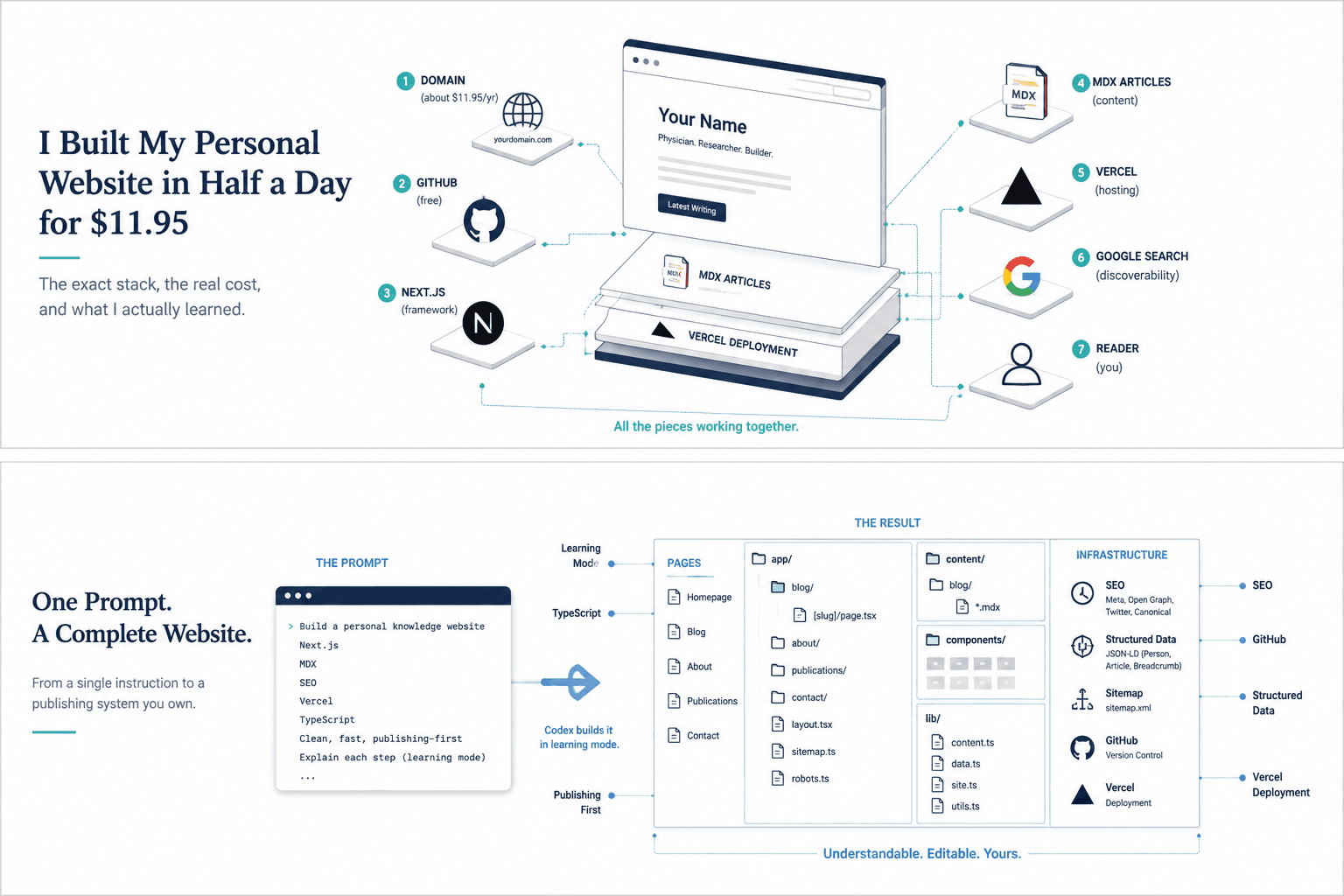
What used to cost thousands of dollars and a freelancer now costs about as much as a to-go lunch.
I built and launched my personal website — my knowledge hub, my brand, whatever you want to call it — in about half a day, in the cracks between running after my kids and taking meetings. It has a homepage, a blog, topic pages, a publications page, real search infrastructure, and a live domain. The only thing I paid for was the domain: $11.95.
A build like this used to mean thousands of dollars and weeks of a freelancer's time. Now the price of admission is roughly a to-go lunch. That cost collapse is the hook, and it is real — but it is not the lesson. The lesson is the thing I kept bumping into all day: the only thing that limited what I could build was what I actually understood. Not what I could type. Not how fast the AI was. What I understood.
That is the whole point of this piece. If you tinker with hobbies, are committed to being a lifelong learner and teacher in some academic capacity, or are building interesting tools — this is a friendly guide for you. And first, and perhaps most importantly, it is a guide to understanding the pieces that make it possible. Because in this new moment, "AI" is not the skill. AI is a word. The skill is understanding the systems in which and on which AI operates as a catalyst. In this part-guide, part-logbook of my own experience, we will cover what a domain is, what a host does, what a repository is, and what a framework gives you. You will learn about GitHub, Vercel, Codex, SEO, and domain authority. The person who understands those pieces can direct an agent to build almost anything online these days. The person who only knows the word "AI" is stuck asking for magic and getting mush.
Why should a doctor build a personal website?
First, why bother? If you are a physician, a PhD student, or anywhere on that path, you already make valuable things and then lose them.
You give a chalk talk that finally makes a hard concept click, and it dies on a whiteboard. You write notes better than half of what is online, and they rot in a Google Doc. You have a sharp take in journal club, and it evaporates when the meeting ends. A personal website is, at its simplest, a place where the work you already do stops disappearing. Give the talk once, and it becomes a post that teaches for years.
It is also where the things you build get a home. If you make a tool, a calculator, a small app, it needs somewhere that feels like yours instead of a bare link floating in a group chat. It is a creative outlet, and — this is underrated — building it is how you actually learn the systems of this era by using them. It becomes a public journal that keeps you honest about your own growth, because writing something you know might be read forces you to finish the thought. And when your work is open and searchable, the right people find it: residents who need your guide, collaborators who read your take, programs that see you think seriously and build real things.
You are already doing the work. A personal website turns that work into something that keeps paying you back. The barrier used to be money, time, and knowing how. Two of those are now basically gone. The third — knowing how — is what this piece is about, so let's take it apart.
The one skill: steering
Here is the actual mental model of how building software with AI works now. It is a loop:
Describe → inspect → correct → commit → repeat.
You describe what you want in plain English. The agent reads your project and edits the code. You run a check and look at the result. You say what is wrong. You save the change. You go again. I did this in short bursts all day, which is the only reason it fit around real life.
Notice what is not in that loop: writing every line by hand. Most of my work was steering — "this copy feels too boastful," "make the photo smaller and link it to LinkedIn," "delete the fake articles and put in the real ones I've already written." Those are judgment calls, not code. The agent handled the translation from intent to working software. I handled whether the result was any good and whether it was true.
But — and this is the part people miss — I could only steer well because I understood roughly what each piece of the puzzle was. Your ability to direct the machine is capped by your understanding of the thing you are directing it to build. So let's build that understanding.
The pieces, and what each one actually is
You do not need to master these. You need to understand them well enough to steer. Here is the whole stack in plain English, and why each one matters.
The domain is your address — mendelmd.com. It is the thing people type, and the one part I paid for. Understand it, and you can own your own corner of the internet instead of renting space on someone else's platform.
The host is the service that takes your code and turns it into a live website. I used Vercel's free Hobby plan, which is intended for personal, noncommercial projects; a commercial site or a project that outgrows its limits may need a paid plan. Understand the host, and you understand how a folder of code on your laptop becomes a page anyone in the world can open.
Git and GitHub are version control — an online home for your code that saves every version and every change, like edit history for a whole website. The key move: you connect GitHub to Vercel, so that when you "push" a saved change, the live site updates on its own. Understand this, and shipping stops being an event. It becomes one command:
git add .
git commit -m "Describe the change"
git push
The framework is the structure your site is built on. I used Next.js. Two things about it are worth actually understanding. First, App Router pages and layouts are Server Components by default, and Next.js can send pre-rendered HTML on the initial page load. That makes the site fast and gives search engines accessible page content without requiring the entire interface to be assembled in the browser. Second, in its layout, folders are pages. A folder named blog becomes /blog. Once that clicks, the project stops looking like a mystery and starts reading like a map:
app/
  page.tsx              -> your homepage
  blog/page.tsx         -> your blog index
  blog/[slug]/page.tsx  -> one template that renders EVERY article
  vital8/page.tsx       -> a section page
  sitemap.ts            -> generates your sitemap
  robots.ts             -> generates robots.txt
That [slug] file is the difference between a template and a system: I did not write a page for each article. I wrote one template that looks up whichever article matches the address. Four posts or four hundred use the same file.
Content as files. Each blog post is a plain-text file (.mdx) with a small header of information at the top:
---
title: "Resident's Guide to Step 3: Minimal Time, Maximum Results"
description: "A brutally honest, time-saving guide for busy residents."
date: "2026-08-04"
category: "The White Coat"
image: "/images/blog/step-3.png"
imageAlt: "A resident studying efficiently for Step 3"
---
Below that header, you just write. Understand this and publishing becomes trivial: adding a new article is dropping a new file in a folder. No database, no admin panel, nothing to babysit.
Styling is Tailwind CSS — how you control fonts, colors, spacing, and layout. Understand it enough to say "smaller," "more spacing," "muted," and the agent does the rest.
The agent was Codex (OpenAI's AI coding tool). It read my project, wrote and edited the files, and fixed errors. It is astonishingly good at the mechanical work. It is also happy to invent confident filler — fake articles, placeholder publications, generic hero copy — and catching that is your job, because it does not know what is true or what is you.
SEO — search engine optimization — is the work of making your site legible to Google, so that when someone types a question you've actually answered, your page is what comes up. It is not a trick or a growth hack; it is a set of boring, honest signals — clear titles, real content, a sitemap, fast pages, and other reputable sites linking to you (which build what's called your domain authority) — that tell a search engine what you are about and whether to trust you. Understand it and your work gets found on its own, at all hours, without you in the room; ignore it and even your best writing sits invisible.
That is the entire toolkit — eight pieces. None of them is genuinely hard once you know what it is, and knowing what each is turns out to be the actual skill.
How the day actually went, start to finish
Put together, the build was just those pieces in order:
- Decide the shape first. Before touching code, I decided the site would represent three real pillars: AI in Medicine, Vital8 and preventive cardiology, and The White Coat. Structure before styling.
- Stand up a skeleton. Homepage, navigation, an article system, section pages. Not perfect — just real enough to hold future writing.
- Steer it into shape. The describe-inspect-correct loop, over and over: fix the voice, shrink the photo, kill the filler, make each section page show the right posts.
- Put in real content. Delete the fake articles and publications; add real posts and real papers with real links. This is what makes a site a site.
- Give the tool a home. Vital8 got its own page instead of a bare external link.
- Wire the plumbing. Connect the domain in Vercel, point the canonical URL at the real address, add the sitemap, robots, structured data, and the Search Console file.
- Check, commit, ship. Run the build, fix what breaks, git push, and Vercel deploys it. Repeat until it feels right.
By the end of a fragmented day there was a live, searchable, real publishing home for my work, for the price of a sandwich.
The part that actually matters
Every time I hit a wall that day, I had to identify what I did not yet understand. Once I understood the role of the domain, repository, framework, deployment, or content system, I could give the agent better instructions and evaluate whether the result was correct.
That is why AI has not made technical understanding obsolete. It has made a working mental model more valuable. Codex could write the files, Vercel could deploy them, and GitHub could preserve the changes. But none of those tools could decide what was accurate, what sounded like me, or what deserved to be on the site.
So build the site and put one real thing on it. When you reach something you cannot yet make, do not treat that as proof that the project is beyond you. Identify the missing piece, learn enough to direct it, and continue.
Ready to build one? I wrote the exact prompt I would paste into Codex, along with a "learning mode" that explains the system while it builds: How to Build a Personal Website With Codex: The Exact Prompt.

Mendel Jacobs, MD, MPH
Menachem "Mendel" Jacobs, MD, MPH is an Internal Medicine Resident at Yale School of Medicine pursuing academic cardiology. He publishes under Menachem Jacobs.
Connect on LinkedIn